


pganalyze Index Advisor is Now Cluster-Aware


Before now, pganalyze Index Advisor has checked for insights on Postgres databases one server at a time. If you had a primary with three read replicas, you’d get four separate sets of index recommendations, each treating the server workload in isolation.
This works for single instance or standalone systems, but it creates problems for scaled out Postgres clusters with replicas that receive read queries. An unused index on your primary might be critical for queries running on your replicas. And you decide which missing indexes to create on the primary, based on the activities of the replica. In pganalyze, this previously required manual effort to decide how to create and maintain indexes on a cluster of servers.
Today, we’re happy to announce that Index Advisor now has special handling of Postgres clusters, that is, a group of a primary server and associated replicas. In this post we share design decisions, trade-offs, and changes we made under the hood.
Detecting missing indexes: Tables and Scans
Let’s start with some background. As we described when we first launched the current version of Index Advisor, one key functionality is that we are not only looking at a single query at a time, but rather a set of queries on a given table.
To identify which parts of a query apply to a given table, we introduced the concept of Scans in pganalyze. A scan is the subset of a query that scans a specific table, filtering it with a set of WHERE/JOIN conditions, and would be represented in an EXPLAIN plan through an Index Scan, Sequential Scan, or similar plan node.
Here is a practical example. We’ll start by making a table and populate it with distinct values.
CREATE TABLE insight_test (
    id SERIAL PRIMARY KEY,
    table_id int4 NOT NULL,
    missing int4 NOT NULL
);

CREATE INDEX idx_insight_testtable_id ON insight_test(table_id);

INSERT INTO insight_test (table_id, missing)
SELECT val, val FROM
    generate_series(1, 10000) _(val);
Now let’s run EXPLAIN to show the query plan and estimated cost of two different scans on this table. The first will use the index on table_id and the other will do a sequential scan, filtering each row on missing, which doesn’t have an index.
EXPLAIN SELECT * FROM insight_test WHERE table_id = 5000;
                                       QUERY PLAN
----------------------------------------------------------------------------------------
 Bitmap Heap Scan on insight_test  (cost=4.72..62.66 rows=56 width=12)
   Recheck Cond: (table_id = 5000)
   ->  Bitmap Index Scan on idx_insight_testtable_id  (cost=0.00..4.71 rows=56 width=0)
         Index Cond: (table_id = 5000)
(4 rows)

EXPLAIN SELECT * FROM insight_test WHERE missing = 5000;
                           QUERY PLAN
----------------------------------------------------------------
 Seq Scan on insight_test  (cost=0.00..195.25 rows=56 width=12)
   Filter: (missing = 5000)
(2 rows)
When pganalyze captures query activity on a database, it detects these two scans, tracks their frequency, and determines if the index is worth adding or not. A sequential scan falls back to scanning all 10,000 rows to find one match, so Index Advisor recommends creating an index for missing.
For an individual server this analysis only has to look at a single set of queries for each database. Things break down when the same table exists across a cluster. Because we make indexing decisions for the whole cluster, we cannot analyze workloads in isolation. Index Advisor needs to be cluster-aware.
Why Cluster-Awareness Is Non-Trivial
For missing indexes, pganalyze utilizes a constraint programming model. This finds the smallest set of indexes with the lowest write overhead that fulfills the target performance criteria like reduced scan cost. You can learn all the details in our documentation.
Making a recommendation for a table in a cluster isn’t just a matter of aggregating the output of that model. Instead, we need to ensure the input data to the constraint solver captures all relevant scans. For context, in the earlier example the input data looks like this:
{
    "Relation Name": "insight_test",
    "Namespace Name": "public",
    "Scans": [
        {
            "Scan ID": "1",
            "Restriction Clauses": [
                "table_id = $1"
            ],
            "Join Clauses": [],
            "Estimated Scans Per Minute": 0.015575396823413846
        },
        {
            "Scan ID": "2",
            "Restriction Clauses": [
                "missing = $1"
            ],
            "Join Clauses": [],
            "Estimated Scans Per Minute": 11.168055554133696
        }
    ]
}
When we combine that with the information that the schema doesn’t have an index on missing, we can conclude that an index needs to be added.
To give a more complex example, let’s say you have a workload on your primary that causes a recommendation for an index on (column1) and a workload on your replica that leads to a recommendation on (column1, column2). If we were to simply aggregate recommendations, we would create both indexes. But instead, we need to make sure the input to the model looks like this, combining both servers:
{
    "Relation Name": "other_table",
    "Namespace Name": "public",
    "Scans": [
        {
            "Scan ID": "1", // activity from primary
            "Restriction Clauses": [
                "column1 = $1"
            ],
            "Join Clauses": [],
            "Estimated Scans Per Minute": 0.357142856607261
        },
        {
            "Scan ID": "2", // activity from replica
            "Restriction Clauses": [
                "column1 = $1",
                "column2 = $1"
            ],
            "Join Clauses": [],
            "Estimated Scans Per Minute": 20.9162667535766
        }
    ]
}
We can then expect the constraint programming model to return an index recommendation of CREATE INDEX ON other_table (column1, column2). Most of the time, the multi-column index alone is sufficient, because the use of leading columns drives the index scan performance for B-Tree indexes.
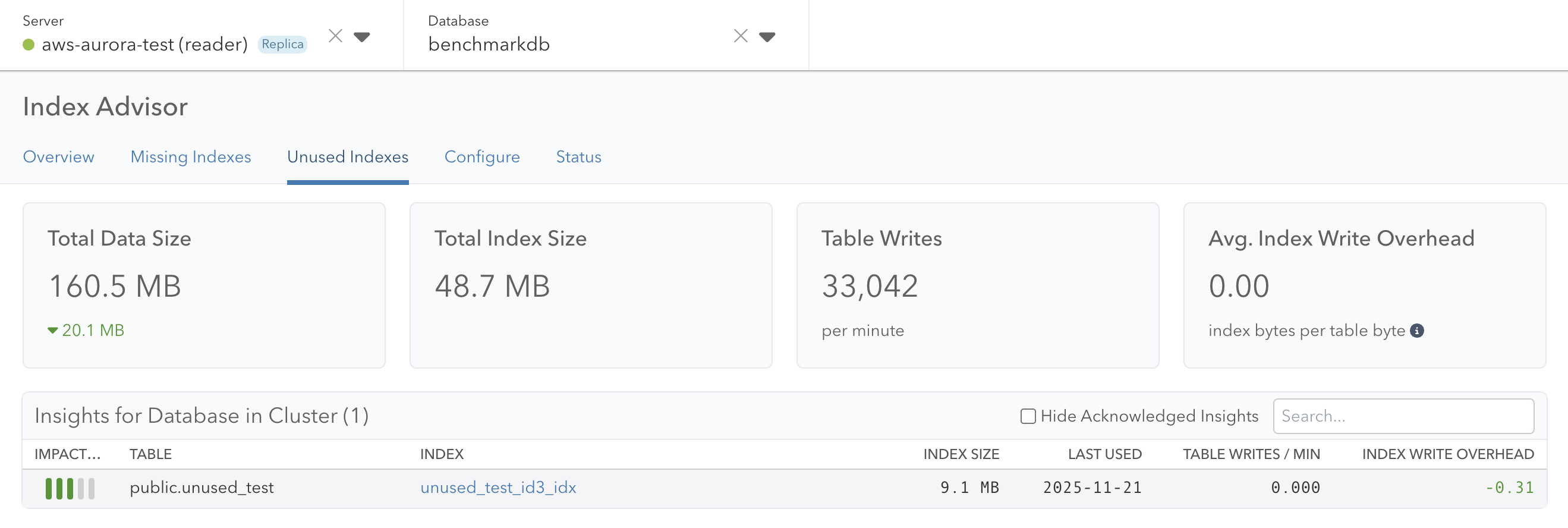
There is a related problem when it comes to unused indexes: Here, looking at each instance of a cluster in isolation led to confusing results. Indexes were showing up as unused on primary servers even though they were serving production traffic on read replicas, causing engineers to drop indexes incorrectly. The solution here is more straightforward: Only consider an index unused if it was not used on any of the servers within a cluster.
The Role of the Primary Server in a Cluster
Once we figured out how to combine the data, we needed to address the user interface problem. Do we surface data on the primary, the replicas, or somewhere else?
For now we’ve decided to make the primary server the source of truth for all Index Advisor insights. For a standalone server, we treat it like a primary, and there is no real change from before. In the case of a cluster, indexing decisions need to be made on the primary, and thus recommendations happen there.
Using the primary server as the source of truth also makes for a simpler consistency model. All insights, queries, and scans aggregate to one place.
From a single table to a set of related tables
There was one more challenge to solve: When we have a single server, we can process each database on the server independently in terms of index recommendations. That means, previously, Index Advisor processed one workload per server, database, and table. Now that Index Advisor is cluster-aware, we need to instead group the activity by database, schema name and table name:
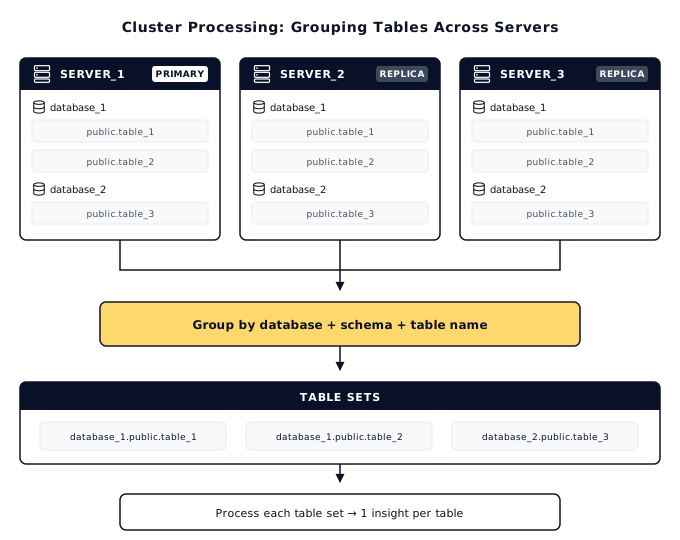
Given a set of table IDs, the Index Advisor then analyzes the combined workload. This allows us to produce a single recommendation per table, for both a standalone server and a multi-instance cluster.
Defining Clusters in pganalyze
To start with, we are emphasizing the automatic detection of clusters, to ensure the system behaves as expected out of the box. For customers using AWS RDS or Aurora, Google AlloyDB, or Crunchy Bridge the collector now tracks cluster IDs automatically, fetching the relevant data from the cloud provider API as needed.
For self-managed servers, we pull the “Database system identifier” from the pg_controldata information, shown here as an example:
# pg_controldata /my/data-directory
pg_control version number:            1700
Catalog version number:               202406281
Database system identifier:           7583772938257241537
Database cluster state:               in production
pg_control last modified:             Tue Jan 27 16:34:57 2026
Latest checkpoint location:           1/1BAF86D0
Latest checkpoint's REDO location:    1/1BAF8640
…
This identifier is identical across different replicas originating from the same primary server.
If you are using a different provider (for example Azure, or Amazon RDS without defined clusters), you can also override the cluster identity of a server using the collector configuration and the api_cluster_id / API_CLUSTER_ID:
[server1]
db_host = my-db-primary.postgres.database.azure.com
...
api_cluster_id = my-db

[server2]
db_host = my-db-replica.postgres.database.azure.com
...
api_cluster_id = my-db
We’re also planning on adding additional ways to define groups of servers in pganalyze in a future release.
The Updated Index Advisor User Interface
The Index Advisor and Schema Statistics pages for a primary server now show estimated scans per minute for the instance and across the cluster. Additionally, affected queries link to databases hosted by any server in the cluster.
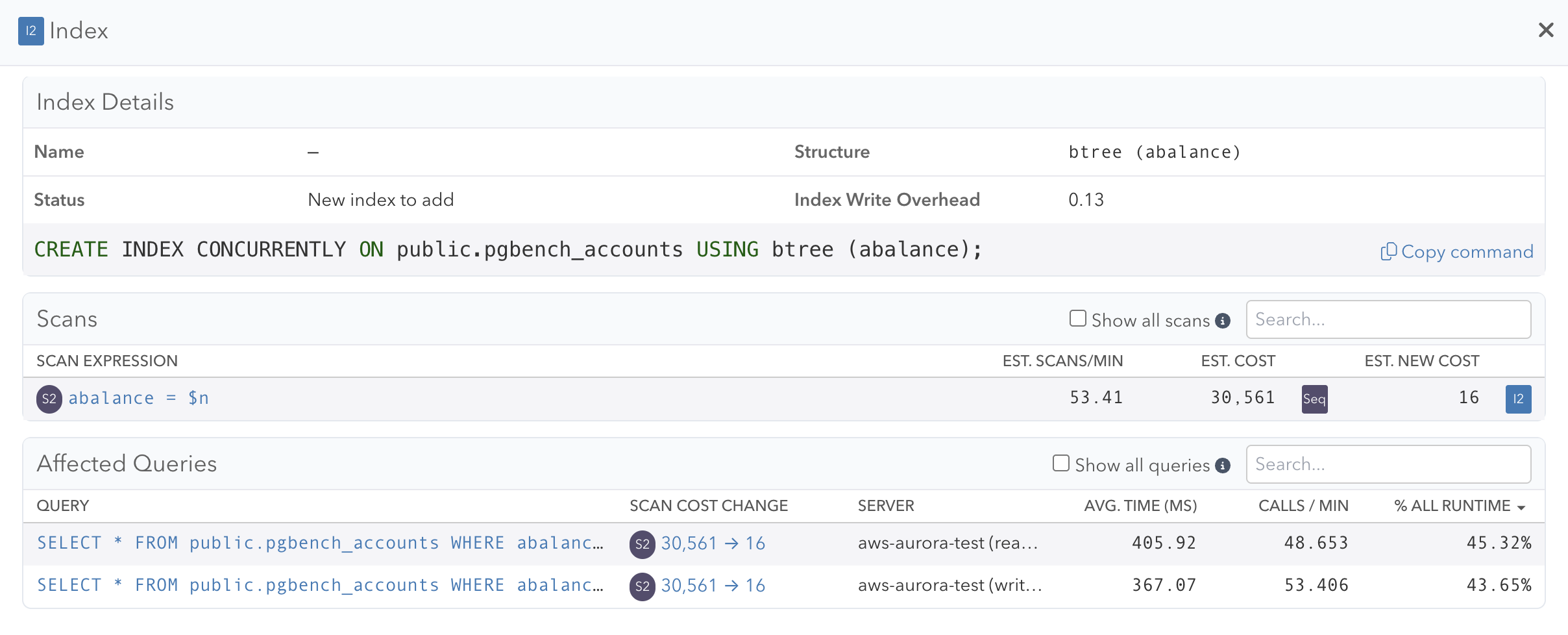
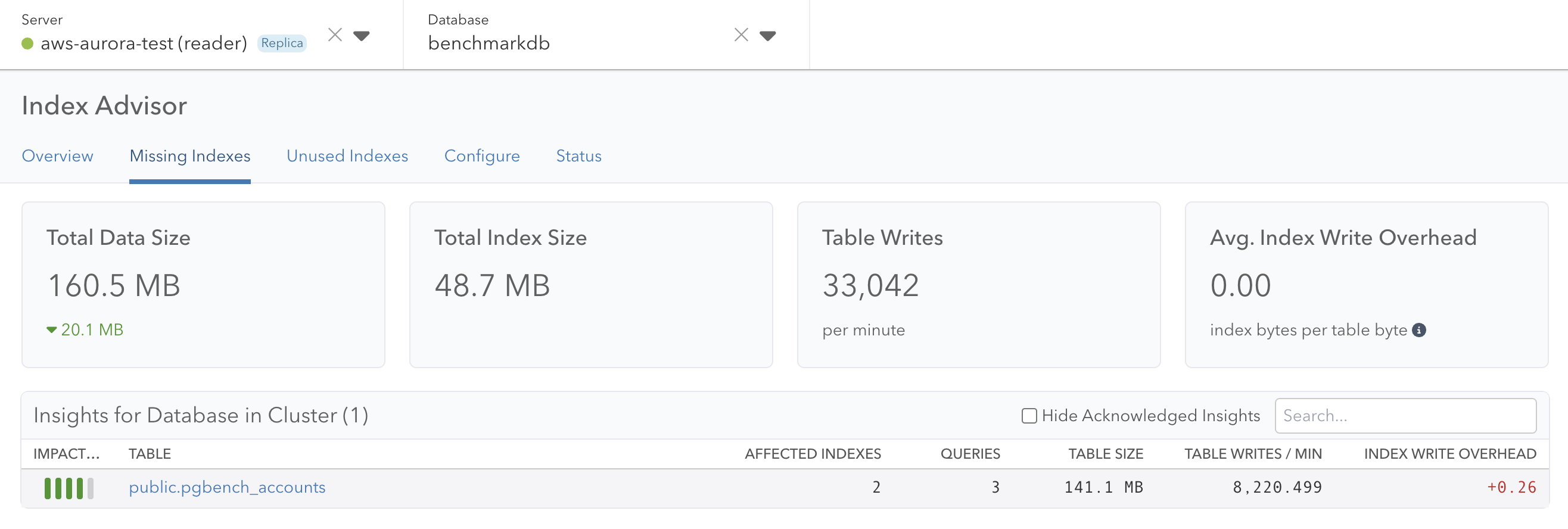
We link to insights from the Index Advisor page, and this is still true for a server in a cluster. In both the primary and replica server case, you’ll see “Insights for Database in Cluster” with a count for the number of active, unresolved insights. When viewing this from a replica server, the tiles at the top of the page represent the data of the primary and all insights link back to the primary.
In Conclusion
Cluster-aware Index Advisor is available starting today, for any pganalyze customer utilizing the pganalyze cloud environment, including Scale and Enterprise Cloud plans. Enterprise Server customers can expect it in the next major release. To incorporate data from replicas, make sure to integrate all replicas into pganalyze. Note that replicas count as 0.5 billable server for current pganalyze plans, making it easy to capture the complete workload in pganalyze.
We have more work under way to improve how pganalyze treats servers as members of a larger environment, a concept we call Server Groups. These will cover both the new cluster mechanism introduced today, and manually grouped servers that help you analyze your system in a more comprehensive way, and make sure that team members responsible for a specific group of servers can quickly find what they need.