


Safely enable AI Coding Tools to use EXPLAIN ANALYZE on production: Introducing Workbooks in the pganalyze MCP Server


Connecting AI coding tools to production is typically ill-advised: it’s not clear what might happen, and how they might cause availability or other issues. But in practice that often means the feedback loop that AI tools rely on is broken, and requires a lot of manual intervention. In the context of database query optimization, the practical problem becomes “How do I run EXPLAIN ANALYZE on production” for a suggested query rewrite.
For humans it’s often just a matter of getting the right access and sign-offs, being extra careful not to impact the system, and potentially running on replicas or clones. For AI tools, that level of access is typically not available, and for good reason. But what if we designed a purpose-built system that enabled safe running of EXPLAIN ANALYZE for AI tools, fed them back the resulting query plan, and also recorded it for easier reference?
Today we’re excited to release query benchmarking with Workbooks in the pganalyze MCP Server in public preview. Claude Code, Codex, and Cursor can now benchmark a query rewrite with EXPLAIN ANALYZE through the pganalyze collector, compare it against the baseline plan, and record every attempt in a workbook your team can open later.
You’re in control whether to enable the new feature, and on which databases. In addition to the MCP Server being enabled, you need the Create Workbooks permission on your account, an MCP client authorized for workbook write access, and the collector workflow set up for the database. See the documentation for full details.
The pganalyze MCP Server has been widely used since its release in public preview in April. Until now, every tool it exposed was read-only. Your coding tool could investigate a slow query from the statistics, plans, and issues pganalyze already collects, but it could only propose a fix. With Workbooks, it can now optionally test each suggested variation in a controlled, documented way.
Why AI query fixes need a tuning loop
Most query optimizations we do follow the same tuning loop. Benchmark the slow query with EXPLAIN (ANALYZE, BUFFERS), form a thesis about what to change, try the change, and benchmark again. A slower version gets another round of testing; a faster query usually ships. Done by hand, that loop usually takes a Postgres expert who knows the data model a reasonable amount of time. An engineer who doesn’t know it, however, can take hours or days to get to the same result. That difference is why production systems stay full of optimization opportunities nobody takes.
You might ask why an AI coding tool doesn’t just iterate through that loop on its own. Claude Code, Codex, or Cursor are good at the first half. Using the query metrics, statistics, plans, and issues that are already captured in tools like pganalyze, the agent can spot a nested loop over the same index millions of times without ever having to connect to the production database. What it can’t know for certain is if the suggested rewrite improves runtime. Without that measurement, the agent either stops to ask you for every EXPLAIN (ANALYZE, BUFFERS) result and runs at human speed, or it keeps iterating in the wrong direction.
Using EXPLAIN (ANALYZE, BUFFERS) is the test for a query rewrite. It is how you know the query actually got faster, not just theoretically faster, and a coding agent that can run the test itself corrects course instead of compounding guesses. The MCP Server’s read tools cover the investigation. Workbooks benchmarking covers the test. That is what enables the AI tuning loop for slow Postgres queries: the agent proposes, pganalyze measures, and the result feeds the next attempt.
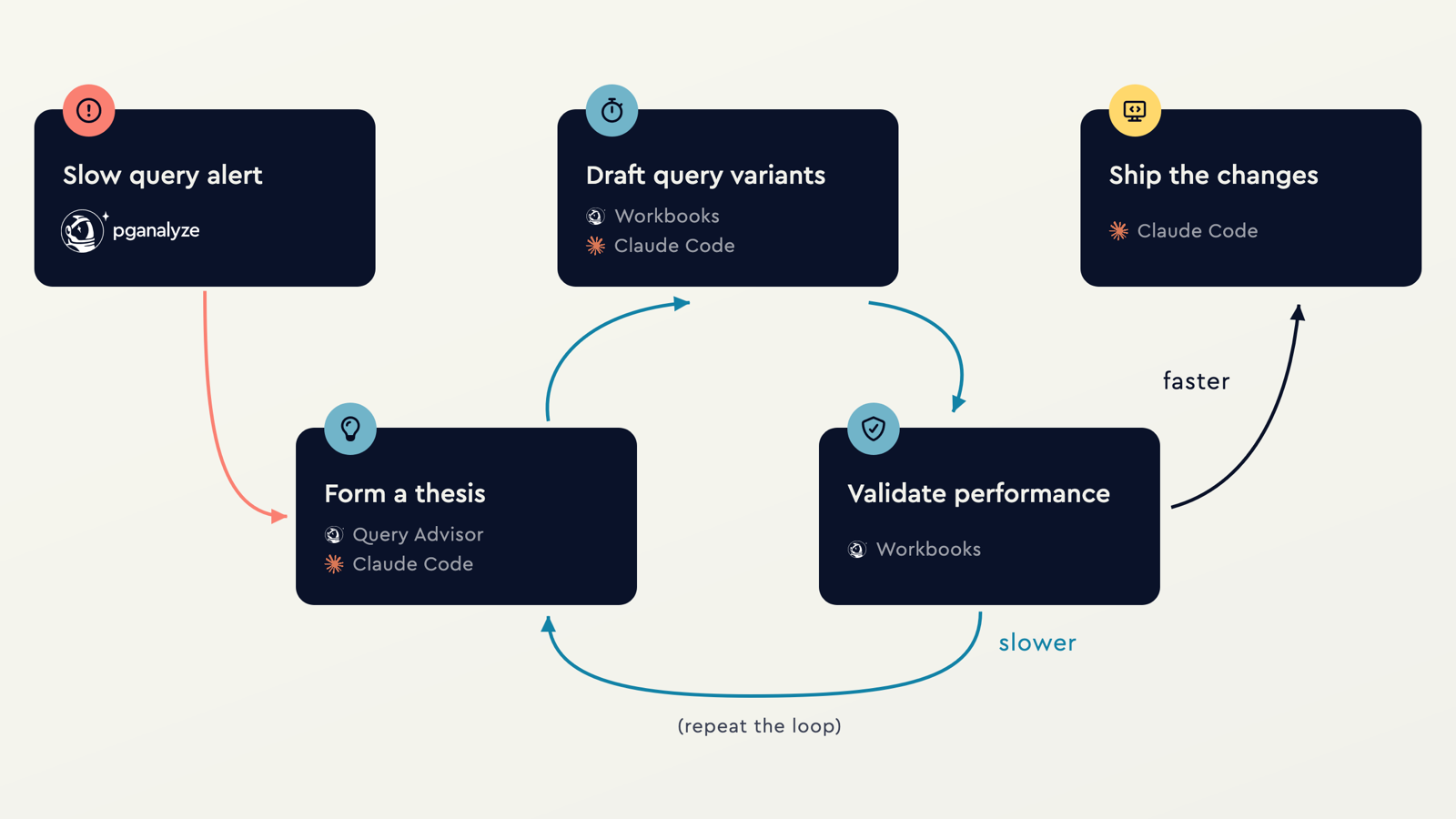
How Workbooks benchmarking works in the pganalyze MCP Server
Workbooks in the MCP Server lets the agent run the same workflow you would use in the pganalyze app, through your MCP client. The agent creates a workbook for a slow query with create_workbook, which runs EXPLAIN ANALYZE through the collector workflow and records the baseline. The baseline EXPLAIN ANALYZE confirms that a past slow execution is still slow, runs the deterministic pganalyze Query Advisor analysis, and allows the LLM to make its own assessment. Deterministic insights can be turned into a candidate rewrite with get_insight_rewrite, and that rewrite (or any of the MCP client’s choice) can be added as a variant with create_workbook_variant, and compared against the baseline plan.
Planner setting changes, whether they are about increasing work_mem or adjusting random_page_cost, can be tested the same way. Each variant records the thesis it tests, so attempts stay reviewable in a shared workbook instead of scattering across a chat log.
The full set is eight tools (see docs): create_workbook, create_workbook_variant, create_workbook_parameter_set, update_workbook, get_workbook_details, sync_workbook, get_insight_rewrite, and delete_workbook_item.
See the loop in action
I want to show you what this looks like end to end, from a slow query to a measured improvement. The video is the full session; the five steps below are the short version.
1. Spot the slow query in pganalyze. A new query shows up in Query Performance averaging about 40 seconds, close to a quarter of total runtime for the last 24 hours and runtime swings wildly from run to run.
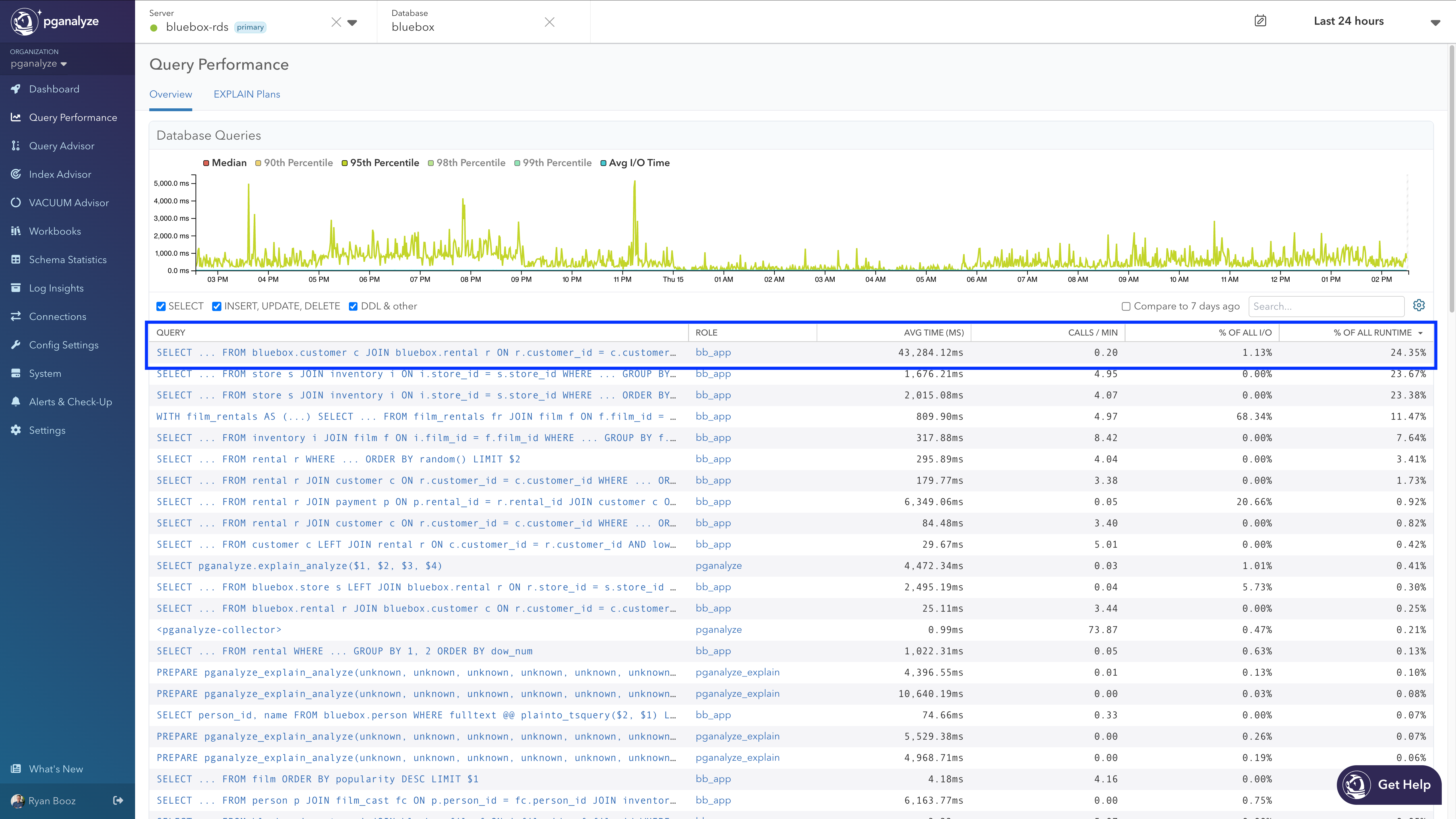
2. Hand the investigation to Claude Code. With the pganalyze MCP Server connected, the prompt names the query and what looks off: runtime varies, buffer counts far larger than the tables themselves.
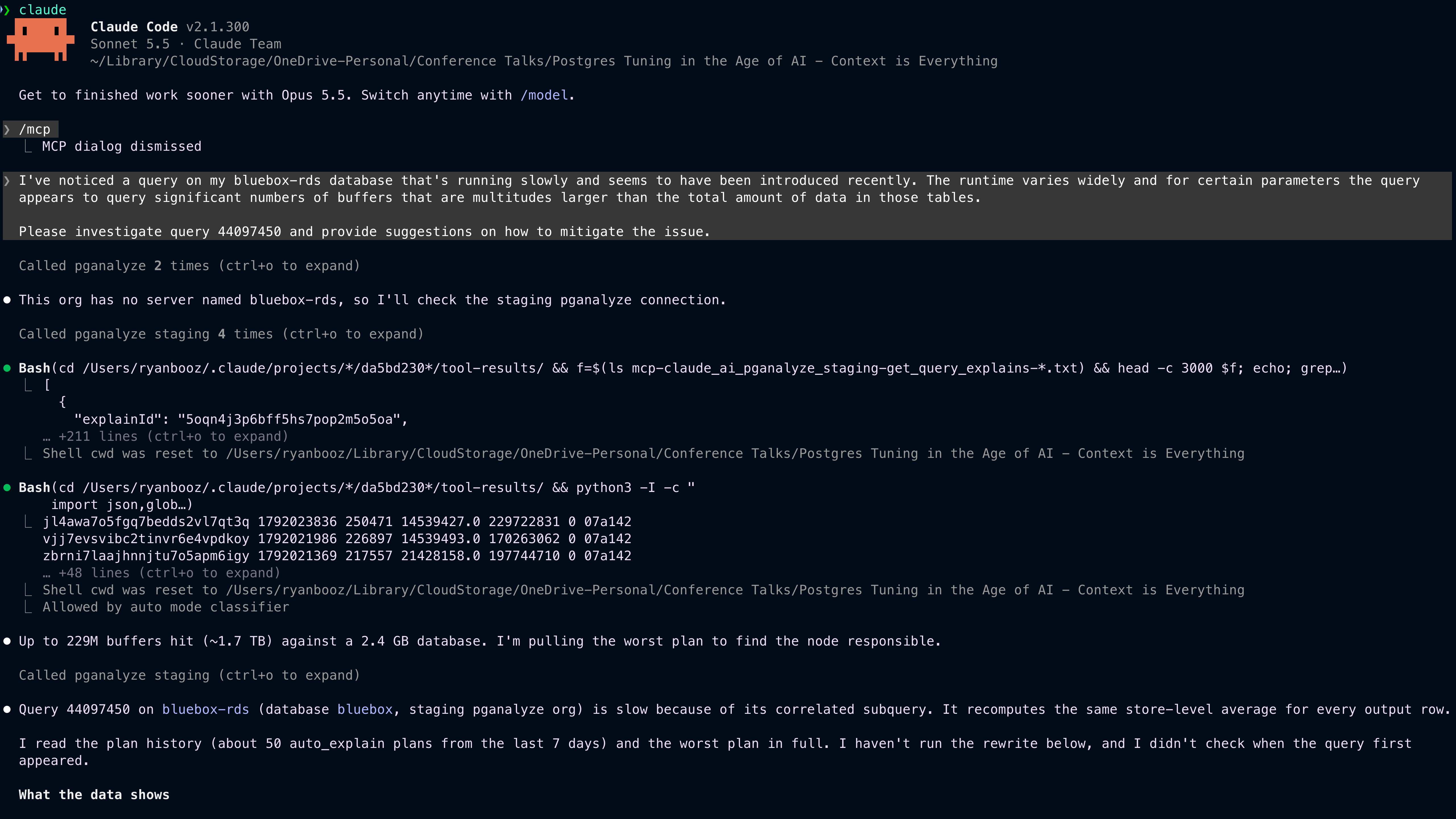
3. Claude Code investigates through the read tools. It pulls recent EXPLAIN plans, finds buffer counts from under a million to over 230 million depending on the parameters, names the correlated subquery as the cause, proposes a rewrite, and offers to benchmark it in a workbook instead of guessing.
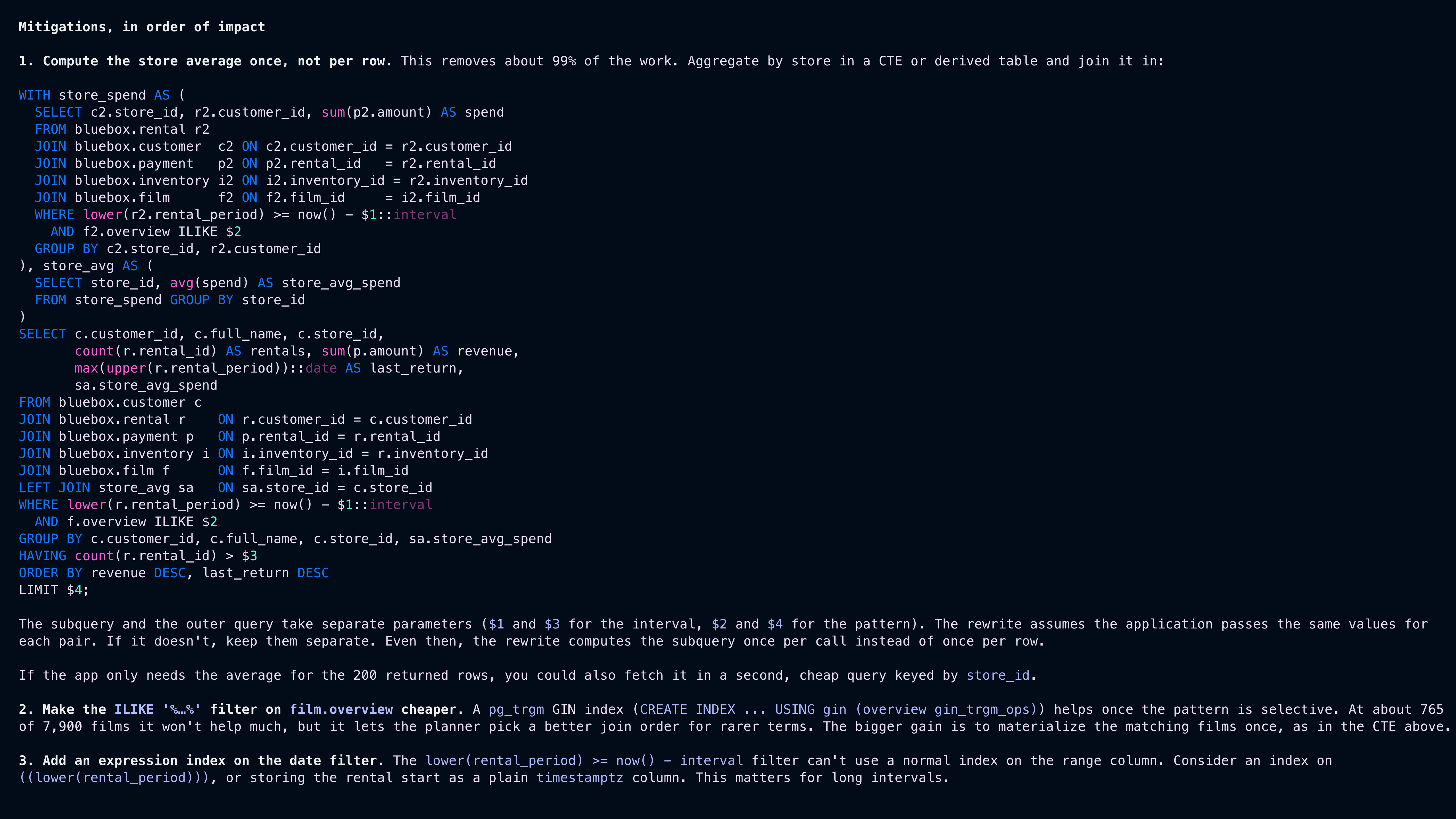
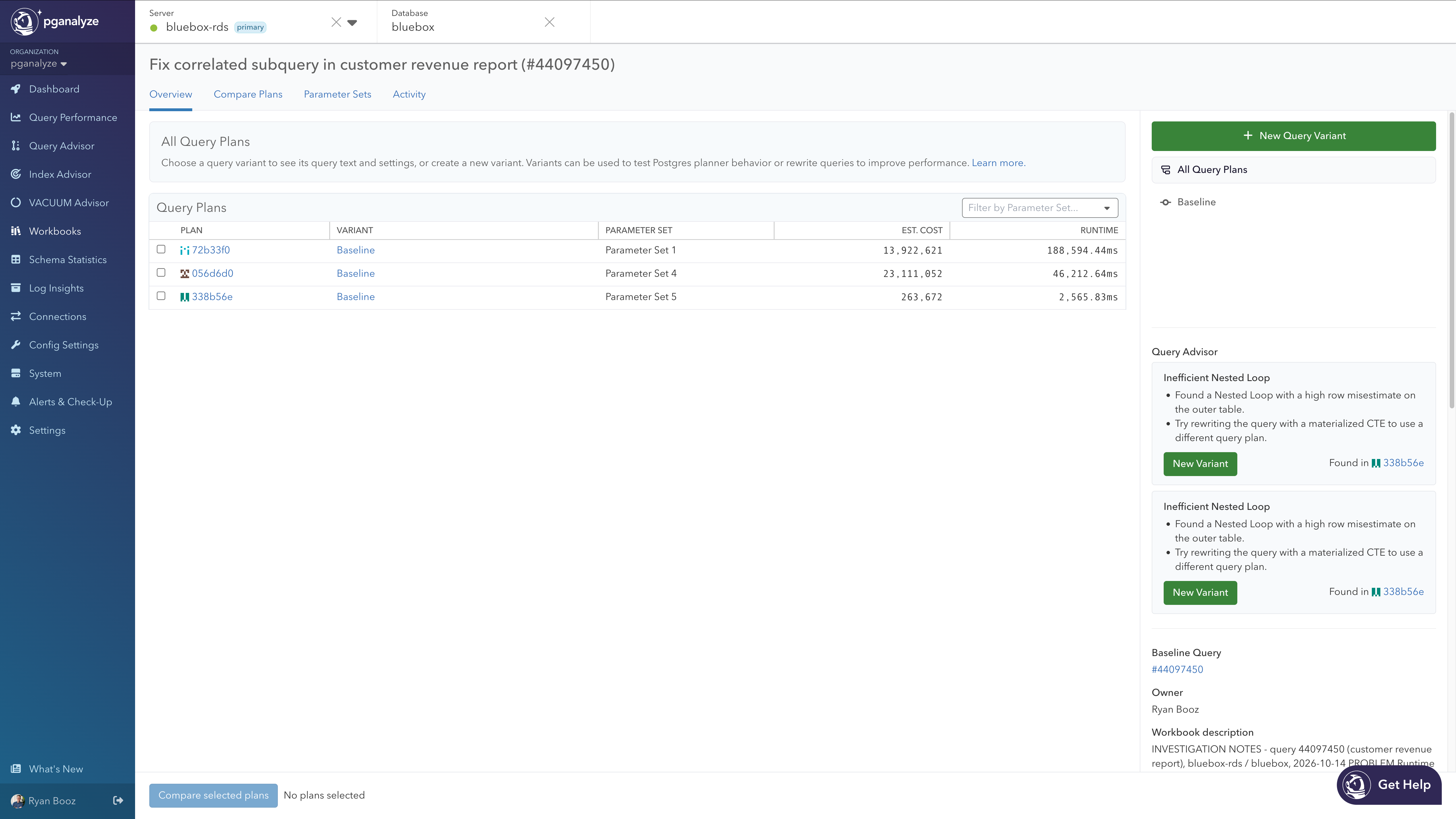
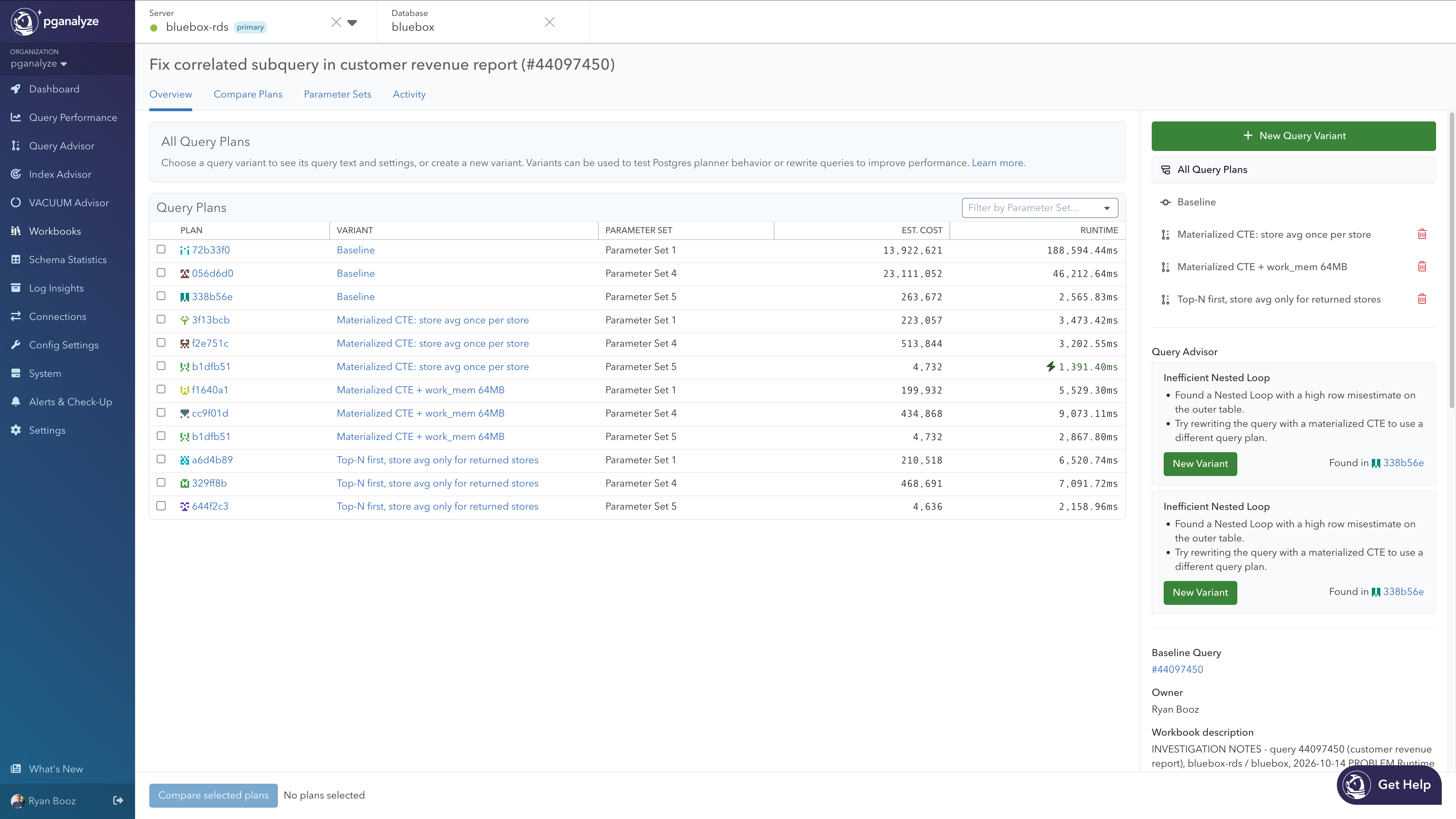
4. Baseline, then variants, in Workbooks. “Create the workbook and do the baseline first” produces three parameter sets and three plans: 188 seconds, 46 seconds, and 2.5 seconds. pganalyze Query Advisor flags the inefficient nested loop on the baseline and suggests the same materialized CTE. Claude Code then runs three variants through the collector and recommends the MATERIALIZED CTE rewrite, which brings the worst case from 188.6 seconds to 3.5 seconds.
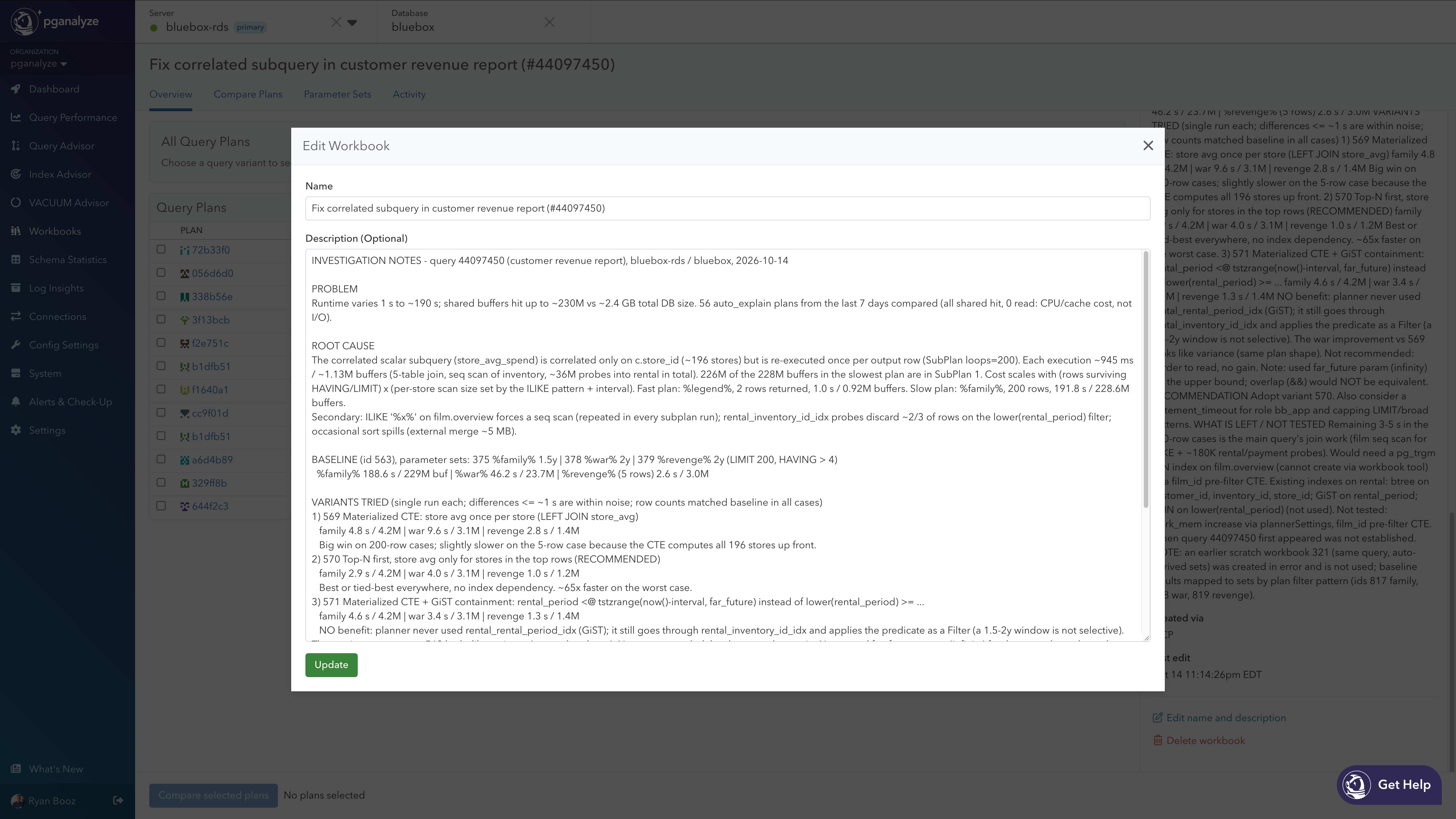
5. Record the investigation in the workbook. “Note all of the work in the workbook” turns the description into the audit trail: what was tried, the results, the recommendation, and what was not tested, so the next person opening the workbook knows why it exists.
Parameter values stay your call
Having multiple parameter sets allows this process to test query rewrites across different data selectivity ranges. If query samples or auto_explain plans exist in pganalyze with this information, the agent can derive reasonable sets for you. When it can’t, it asks you to confirm values rather than filling them in on its own.
Using the same parameter sets for each variant allows us to perform a more realistic apples-to-apples comparison of each variant to the baseline.
Guardrails for running EXPLAIN ANALYZE from an agent
The capability is deliberately narrow. The agent gets no direct database connection. The pganalyze collector, running in your environment, executes EXPLAIN ANALYZE and nothing else: no arbitrary SQL, in a forced read-only transaction that aborts after 60 seconds, with permissions scoped per server. EXPLAIN ANALYZE does execute the query being analyzed, which is why these tools sit behind a separate write scope and the same Create Workbooks permission the app requires.
How to enable Workbooks benchmarking for your MCP client
Grant the Workbook write scope when your MCP client authorizes with pganalyze, and set up the Workbooks collector workflow for the database; the MCP Server docs cover the permissions and collector version in detail. If you run pganalyze Enterprise Server, contact us and we will walk you through enabling it on the latest release.
Also new in the pganalyze MCP Server since April
Workbooks benchmarking is the largest addition, but the MCP Server has grown from 20 tools at the start of public preview to 30 today:
- Log Insights tools.
get_log_statsreturns time-series counts of collected log lines by classification, andget_log_linesreturns individual log lines, newest first, with optional filters over the last 7 days. - System metrics.
get_system_statsreturns OS-level time series for CPU, memory, storage, network, and WAL size. - Cluster-aware Index Advisor.
run_index_selectionandget_index_selectionagainst a cluster primary return the Server Groups view: scan data aggregated across the cluster, with each affected query labeled by its source server and database. - Personal access tokens (early access). A scoped credential for scripts and background agents that acts as you, including the workbook write scope for unattended Workbooks runs.
- Enterprise Server and more clients. The MCP Server has been available on Enterprise Server since v2026.05.0, and the OAuth redirect allowlist now includes hosted platforms such as Composio and Devin.
What’s next: Tuning loops inside pganalyze
The MCP Server brings pganalyze data to the AI coding tools you already use. The next step optionally brings AI functionality directly into certain flows in pganalyze. In our July webinar, Lukas outlined where this is going: pganalyze advisors already run in the background, all the time, without consuming tokens. When one finds a bad query plan, it can kick off an investigation that iterates with an LLM in the picture. More on that later this year!
We are also working on running Workbooks against copies or clones of production, for example an Aurora clone, so that index changes can be verified the same way query rewrites are today.
Try it now
Assuming your database server is enabled for the collector workflow, connecting the Workbooks benchmarking ability takes one step in each client. When the OAuth flow opens, grant workbook write access alongside the read scopes so Workbooks benchmarking is available from the first session.
Claude Code
claude mcp add --transport http pganalyze https://app.pganalyze.com/mcp
Codex
codex mcp add pganalyze --url https://app.pganalyze.com/mcp
Cursor and other MCP clients
Add https://app.pganalyze.com/mcp as an HTTP MCP server in your client’s settings. The docs cover the Cursor configuration block, other clients, authentication options, and the full tool reference.
In conclusion
We hope this gives you a safe way to let your coding tool do more tedious work for you, whilst reporting back results and letting you make informed decisions on code changes. We’re excited about other functionality coming soon & are looking forward to your feedback!
Resources
- Sign up or log in to pganalyze to connect from Claude Code, Codex, Cursor, or any other MCP-compatible client.
- Set up the Workbooks collector workflow so the agent can run
EXPLAIN ANALYZEon your database. - The AI Tuning Loop to Fix Slow Postgres Queries (PDF), a short engineering brief: why slow queries stay slow, the five steps of the loop with measured results from a real run, and what safe validation from an agent requires.
- Watch the July webinar replay for Lukas’s walkthrough of the loop with Claude Code.
- Let us know what is working, since the tool calls are still being refined during public preview and your feedback shapes them.