Option to run On-Premise
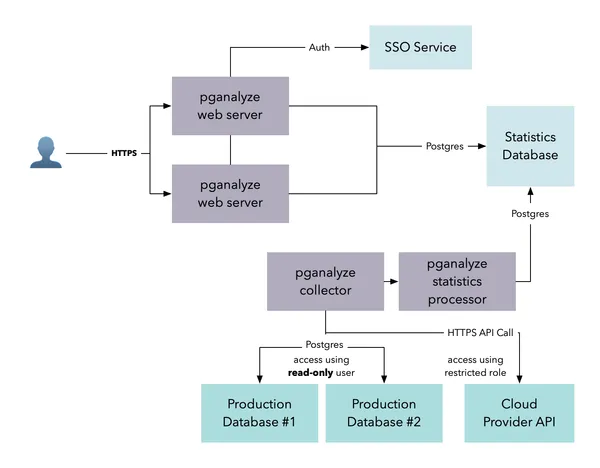
If you choose to run pganalyze on-premise it will run in a Docker container behind your own firewall, on your own servers.
No data will be sent outside your systems so you can always keep control of your data.
Encrypted Log Monitoring
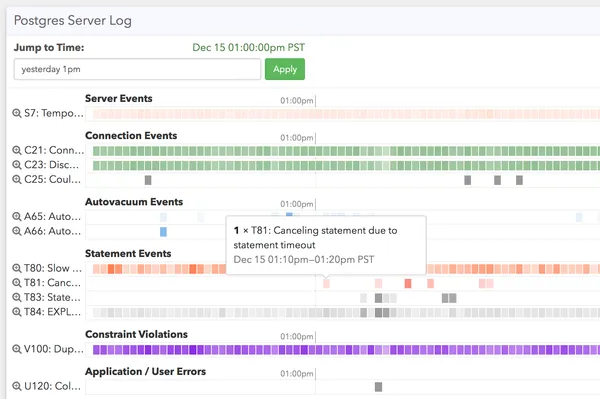
Store logs safely on local servers or Amazon S3. Stop leaving unencrypted log files with PII on a server or development machine.
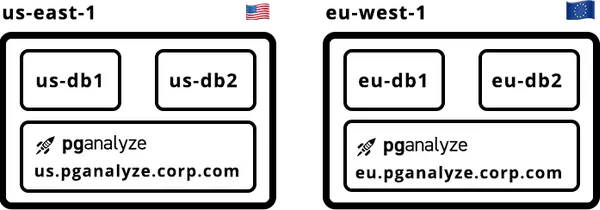
Store statistics in compliance with local policies
Some countries, for certain kind of databases, require you to store all data within their borders. When you use pganalyze on-premise, it allows you to retain statistics data in the correct region of the world to comply with local policies.
Sensitive data
Work with sensitive databases that store data such as medical information, financial data or other high security databases
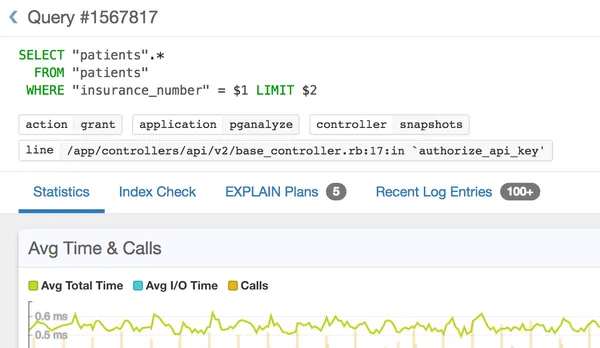
pganalyze normalizes query information so that only structural data is stored and presented, with all sensitive information filtered out ahead of time. Learn about PII filtering in Log Insights→
SSO Integration
To enable seamless login without having to maintain another password, and allow all team members to easily collaborate, we support single sign-on (SSO).
pganalyze integrates with your Active Directory, LDAP, Okta or Google Apps setup.

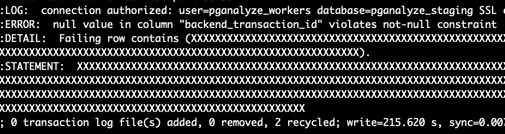
Careful PII handling / query normalization
- Dashboards show normalized query text not containing any end-user data
- Safely share production database statistics with your development team
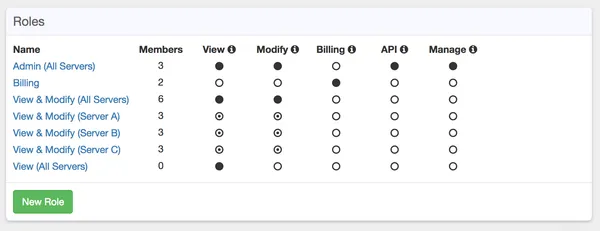
Sophisticated User Management and Permissions
Restrict access to specific databases and servers, specify whether a user is allowed to modify check configuration, and manage the system vs. exclusively viewing statistics and analysis.
Share production statistics without sharing database access and invite your remote DBA or external contractors to help out.

Hundreds Of Companies Monitor Their Production PostgreSQL Databases With pganalyze
Frequently asked questions
Does pganalyze have access to the data in my database?
No. The pganalyze collector connects with a monitoring role that can only read system statistics and metadata, so it cannot query the rows in your tables or modify your database. The collector is open source, makes only outbound connections, and does not listen on any ports. Run pganalyze-collector --dry-run to see everything it would send. Note that when using pganalyze Log Insights the collector will also capture log events, some of which might contain sensitive data. This data can be filtered with the PII filtering options.
What permissions does the pganalyze collector need? Does it need superuser?
Superuser, or the provider's admin role such as rds_superuser, is needed once, during setup, to create the monitoring user, enable pg_stat_statements, and install the helper functions. After that the pganalyze collector runs as a dedicated pganalyze user with the built-in pg_monitor role and no superuser rights, limited to five connections.
What data does pganalyze send out of my network, and where is it stored?
The pganalyze collector sends schema definitions, query statistics with normalized query text, table and index statistics, OS metrics, and, if you enable Log Insights, classified log lines. It sends them over WebSockets or HTTPS to api.pganalyze.com, or to your own pganalyze Enterprise Server. It never sends rows from your tables or the results of your queries.
Does pganalyze filter PII and query parameters?
Filtering happens inside the pganalyze collector, on your infrastructure, before anything leaves. Query text is normalized, so secret = '123' is stored as secret = $0. By default the collector also redacts Postgres credentials and any log line it cannot classify. Parameter values in query samples are sent unless you set filter_query_sample: normalize, and filter_log_secret: all can be used to redact every potentially sensitive log message; the docs list the maximum-privacy configuration.
Is pganalyze SOC 2 certified?
Yes. pganalyze is SOC 2 Type 2 certified. The cloud service runs in AWS data centers, payments go through Stripe, and a bug bounty program covers the application. You can request the SOC 2 report through the link below. We recommend that teams that need monitoring data to stay inside their own network run pganalyze Enterprise Server instead.
Does pganalyze support SSO with SAML, Okta, or LDAP?
Yes. pganalyze supports sign-in with username and password, Google, and SAML 2.0 identity providers such as Okta and Microsoft Entra ID. SAML SSO is available on the Scale plan and above, and is not enabled during trials. LDAP and Active Directory are supported on pganalyze Enterprise Server. Every plan includes unlimited users, and permissions can be scoped to a server or server group.
How long does pganalyze retain my data?
Historic statistics are kept for 14 days on the Production plan, 35 days on Scale, and 100 days on Enterprise. When you remove a server from pganalyze, its data ages out within that retention window, and support can delete it immediately on request. Metadata as well as information in pganalyze Workbooks is kept until you delete them or request deletion.
Can I self-host pganalyze on-premise?
Yes. pganalyze Enterprise Server is a fully self-contained version of pganalyze that runs behind your firewall on Docker, on Kubernetes with EKS or AKS, or on a VM, with the same query monitoring, Index and Query Advisor, EXPLAIN analysis, and Log Insights as the cloud service. No monitoring data leaves your network. It is part of the Enterprise plan; contact pganalyze for a trial.